
Over the years, our SEO agency has fallen into a recurring trap — our software subscription costs have accumulated. It’s easy to do. There are so many SEO tools and software available to power your services. The costs seem small at first, but add up annually.
We’ve streamlined our toolset, taking a hikers' approach to better managing our expenses and improving profitability.
We think about building our toolset similarly to packing a backpack. When hiking, it’s crucial to bring the essentials and leave behind unnecessary items that will weigh you down. Choosing an SEO toolset for your agency requires the same thoughtful and intentional preparation.
A streamlined toolset has positively impacted more than our expenses — our agency can work more efficiently and focus on the tasks that lead to the highest impact for our clients.
This guide will help you carefully curate your agency's SEO toolset to ensure you have what you need without data overload and unnecessary expense.
What Tools Do You Need to Deliver SEO Services?
Let’s break this down by category.
Business Tools
If you are getting started building your web design or digital agency, you’ll want to start by selecting a business toolset — tools to support email, file sharing, calendars, and more.
At our agency, we like the Google Workspace. This includes Gmail, Calendar, Drive, Google Docs, Google Sheets, and more.

Google Workspace is easy to use and not surprisingly, also integrates nicely with other Google products like Analytics, Search Console, and Places for Business.
The Business Standard pricing is $12/month/user.
Project Management
Whether you are a solopreneur or building a team, a great project management tool is necessary for your agency. Project management tools allow you to break your client’s SEO strategy into a series of tasks, manage multiple projects simultaneously, and stay organized.
Our agency has used several project management tools over the years, including Basecamp, Trello, Asana, and Teamwork. That was all before we found ClickUp.
ClickUp is now our team’s favorite project management tool. It’s customizable, easy to use, and visually appealing.
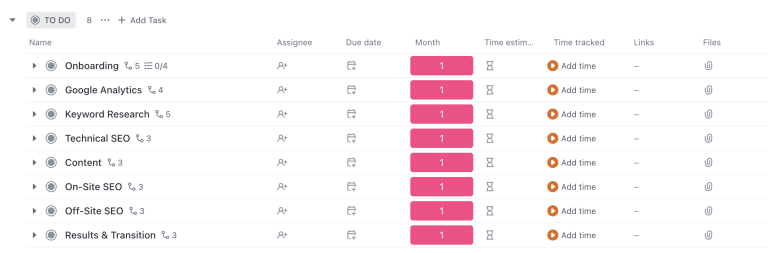
The ClickUp’s Unlimited Plan is $7/month/user.
Accounting & Payroll
While we don’t love our accounting software, primarily due to the cost, we have used QuickBooks Online for the past fifteen years. It facilitates bookkeeping, invoicing, and online payments.
We use Gusto for payroll services. It integrates nicely with QuickBooks and has made the HR aspect of growing a team in multiple locations relatively straightforward from a taxation standpoint.
The costs for these two software varies based on your needs and their introductory offers.
Process & Training
Once your business needs are complete, we can explore SEO-specific tools and software. At our agency, we spent years taking courses and learning on the job before perfecting our SEO processes. It took us even longer to build a training regimen for new hires.
Fortunately, this is now all available to you in Pathfinder SEO. Our community platform has process and training documentation built in. If you are new to offering SEO services, you can follow our step-by-step process to delivering the service. If you already have an established offering, your junior team members will benefit from it, and you can save time and money on training.
The process documentation is built into a series of checklists — SEO Assessment, SEO Set-Up, and Monthly SEO.
We also have group training sessions to answer questions and learn through our welcoming, supportive community.
Data & Monthly Reporting
Making data-driven decisions is the name of the game regarding marketing campaigns. To do so, we need to collect, analyze, and compile the data in a monthly report that’s easy for clients to understand.
At our agency, we use three tools to support this:
- Google Analytics — This free, enterprise-level web analytics software measures website performance. Simply set up an account and add the tracking code to any client's website. There's also a good chance new clients will already have an Analytics account and can add your agency as an admin.
- Google Search Console — Set up a communication channel with Google via Google Search Console. You won’t talk to an actual Google team member, but you will gain insight into which keywords and pages bring organic traffic to your client websites. Further, Google Search Console will support your technical SEO efforts.
- Google Looker Studio — Another free tool by Google that let's you create customized reports pulling in data from a large amount of sources at one.
Google Looker Studio for Custom Reporting
Automate your marketing reports and focus on the data that matters.
Learn how to build custom reports that integrate with Google Analytics, Google Ads, and more in this 1-hour course.
Bonus: Google Looker Studio Monthly SEO Template
Keyword Research & Rank Tracking
The most fundamental skill in delivering SEO services is keyword research. This supports your entire SEO strategy. At Pathfinder, we teach a keyword research process that is more about the real-world and big picture than about tools and data. This is because most SEOs go wrong when they rely on automated research tools that don’t reflect the client’s business and goals.
That said, there is a place to quantify your keyword research into data and track keywords. Wincher is one of our recommendedation for researching and tracking keywords for your clients. Check out their suite of tools to see how it could fit into your agency toolkit.

If you are looking for another handy keyword tool, check out Keywords Everywhere. It’s affordable and surfaces data for you directly on the search engine results page, which is pretty cool.
Local SEO
Local search offers small- to medium-sized businesses an opportunity for a quick win and helps them level the playing field with larger competitors.
Your primary local SEO software is Google Places for Business, which allows you to manage your clients' Google Maps listings.
Audits
Many SEO audit tools are on the market, including Semrush, Ahrefs, and Ubersuggest. All are feature-rich and provide automated scanning and reporting capabilities. At first, such features sound helpful, if not essential, in offering SEO services.
Unfortunately, this type of SEO software is overwhelming for most web designers and digital agencies. You need a certification to use it. The data and feature overload can lead to inaction or chasing low-impact SEO tasks instead of building a focused, long-term strategy. Furthermore, Google has noted that automated SEO audits tend to be outdated and focus on factors that don’t matter in the algorithms.
Instead of utilizing these SEO software, our agency relies on several simple and free tools, including:
- Google Search Console — This tool gives you feedback from Google on technical SEO and more.
- Screaming Frog —This software is a website crawler that helps you improve on-site SEO and address common SEO issues. It also supports offering SEO to larger websites by scanning and documenting the details of each page on a site.
- Detailed SEO Extension for Chrome — This free extension makes it easy to get the SEO-relevant details of a webpage. For example, this handy tool lets you quickly see the page title, meta description, headers, word count, and so much more.
Content
Regarding an audience-first SEO strategy, we recommend working with copywriters to power your client’s blog and page copy. AI tools just don’t cut it.
That doesn’t mean you can’t leverage AI tools to accelerate your content marketing initiatives. At our agency, we rely on ChatGPT as a calculator for content marketing tasks. It creates outlines and lists of frequently asked questions that our copywriters can leverage as they create content powered by genuine expertise and experience.
Plugins, Modules & Content Management Systems
WordPress is our favorite content management system for SEO. And many of your clients are likely to have WordPress websites.
You need a multi-function SEO plugin to execute your SEO strategy on WordPress. Here are our three favorites:
- Yoast SEO — Yoast SEO is a multifunction SEO plugin. Built by SEO professionals, this plugin is on the cutting edge of SEO. The free version includes everything you need to give a client a solid SEO foundation. The premium version layers in even more tools, like the ability to redirect pages and more in-depth analysis of a site's content against your preferred set of keywords. With over 5,000,000 active installs, this plugin is by far the most popular in the WordPress space, and for good reason.
- Rank Math — This plugin is an up-and-comer in the WordPress space. It has many of the same features that Yoast SEO does but provides a better user interface and some free functionality that you would have to pay Yoast for. Rank Math has over 1,000,000 active installations and is updated frequently to ensure it keeps up with the ever-evolving nature of SEO. The pro version of this plugin extends the functionality even further but isn't necessary for most small- to medium-sized businesses.
- All in One SEO —This feature-rich and easy-to-use plugin allows you to build an XML sitemap, add page titles and meta descriptions to your posts, and much more. It has over 2,000,000 installs and is updated frequently, like Yoast and Rank Math. It recently received a complete user experience overhaul and rapidly received new features.
Regardless of which WordPress SEO plugin you select, the first step is installing it. The plugin then needs to be configured to help grow traffic. Pathfinder SEO subscribers can follow our step-by-step process to do so.
Don't worry if your prospect or client isn't on WordPress; you can still execute a solid SEO strategy and drive growth. Content management systems like Wix, Squarespace, and Shopify have solid SEO infrastructure. Often, the SEO functionality you need will be built into the platform.
AI Tools
Artificial intelligence is rapidly reshaping how agencies approach SEO from content creation to on-page optimization and reporting. While AI isn’t a full replacement for strategy or creativity, it can be a powerful tool to accelerate workflows, save time, and spark new ideas.
Here are a few AI tools worth exploring:
- Altext.ai — If your agency is creating image-rich blog posts or managing content with accessibility in mind, Altext.ai is a must-have. It automatically generates alt text for images using AI, helping your team meet accessibility standards and improve on-page SEO, without the manual effort.
- Surfer AI — Surfer AI blends natural language processing with SEO optimization. It creates content outlines and drafts that are optimized for specific keywords, saving your writers hours of prep time while aligning with ranking signals.
- ChatGPT — From brainstorming title tags to generating FAQ schema, ChatGPT is a versatile assistant for marketers and SEOs. It works best when paired with a clear prompt and human oversight, but it can reduce friction in your day-to-day tasks.
- NeuronWriter — This AI-powered writing assistant focuses on semantic SEO. It helps you plan content that aligns with search intent and competitor pages, using NLP-based recommendations to guide your writing.
Choosing SEO Software for Your Digital Agency
Take your time when choosing your SEO software. Start with Google's free tools for your digital agency — Google Analytics, Google Search Console, and Google Business Profile.
Then, add one general-purpose SEO tool to support your keyword research, rank tracking, and monthly reporting. Of course, we are biased towards Pathfinder for educational resources and courses, but you can find out why by joining our community today!
Join our Monthly Newsletter
Stay ahead in SEO. Get once-a-month updates with SEO tips and news.