Monthly SEO reports are a key component of ongoing SEO services as they:
- Fulfill your client’s expectations. Most clients expect monthly reports. It’s an industry best practice.
- Keep lines of communication open. By sharing your insights on the campaign performance data, you ensure your client understands the results even if they are too busy for a call.
- Inform your overall strategy. You can’t manage what you don’t measure. Reviewing the client’s monthly results ensures your action items are targeted for the greatest strategic impact.
- Build trust. By communicating the performance of your SEO campaign, you build a partnership with your client based on trust. This increases the value of your services.
Now that you know why monthly reporting is valuable, let’s explore how to create, analyze, and send monthly SEO reports.
How to Create a Monthly SEO Report for Clients
Google Analytics is the core data set that powers a monthly SEO report. It provides insights into the session volume, visitor engagement, and key performance indicators (key events or conversions).
This can be supplemented with keyword rank tracking data so your client can monitor progress in improving the keyword's visibility on Google.
We recommend automatically creating a monthly SEO report. This ensures a consistent finished product and saves time.
There are many software available to create SEO reports. Your first step is to decide which software to use. There are several key considerations, including:
- Ease of setup
- Customizability
- Price
- Third-party data integrations
Here’s an overview of the best automated SEO reporting tools for web designers and agencies:
Google Looker Studio
A free software, Google Looker Studio supports the creation of a highly customizable report template for your agency with connections to multiple data sources. There is endless flexibility, which is an advantage. Unfortunately, that also comes with a steep learning curve and a high time commitment. Google Looker Studio is best for agencies that serve medium to large businesses on retainers of $1,500/month or more.
AgencyAnalytics
A paid software that is focused on white-label reporting for agencies. AgencyAnalytics features many data integrations and templated reports to help jumpstart your efforts. While easier to learn than Google Looker Studio, creating the initial report for your clients is still a time commitment. AgencyAnalytics’ reports are best for agencies that service medium- to large-size clients on retainers of $1,500/month or more.
Monthly SEO Reporting Process for Agencies
With reporting being a key component of your SEO services offering that you include monthly, you'll want to create a standard process so your team can easily deliver monthly SEO reports and scale.
A process for monthly reporting includes:
- Analyze the data. Review the automated report to get a sense of the trends. What data do you want to feature in your written summary for the client? What data requires more investigation? Can you tie any of the results to recent action items? For example, you improved keyword rankings on a blog post you revised and improved on the client's website.
- Explore any significant shifts or trends to understand the why. This may require opening Google Analytics and/or the Google Search Console. With SEO, there aren't always singular reasons why the results are what they are. For example, external factors outside your control may be at play, like a shift in market demand causing an increase or a decrease in traffic. Alternatively, Google's algorithms may have evolved to favor your client's content.
- Write a summary of the data. Draft the content for an email to the client to deliver the monthly report. Include a mix of quantitative data with a qualitative summary so those clients who aren't comfortable with numbers still get value from your write-up.
- Update the monthly action items based on any insights from the report. This is the project management component of monthly reporting. Determine what tasks will be completed this month and assign them to the proper team member.
- Email the report to the client, including your summary. Export your client's report as a PDF and attach it to an email with your written summary.
Analyzing Monthly SEO Reports
A monthly SEO report contains the what. Your analysis allows you to communicate the why and the how, and these insights create value for your client. This is why we don’t recommend sending an automated report to your client without context. They need your analysis, a written summary synthesizing the information, and a PDF copy of the report.
Before you analyze a monthly SEO report, it’s helpful to understand the layout and metrics. The reports begin with the big picture of Website Performance, which includes data from all marketing channels. Then, we move into Organic Search Performance, highlighting the marketing channel that SEO impacted. Finally, we include Keyword Performance, which is the rank tracking data.
In each of these sections of the reports, you’ll see the same metrics. Here are a definitions and ranges for what may be considered suitable for each:
- Sessions — Google Analytics records a session when a user visits your client's website. We don’t have a standard target for all websites on the number of sessions each month. Instead, we focus on percent increases compared to last month or year.
- Session Duration — The average time a user spends on a website. A session duration of over 1 minute is considered good for most websites.
- Engagement Rate — The percentage of sessions on a website that were meaningfully engaged, meaning they stayed on the website for longer than 10 seconds, visited 2 or more pages, or completed a conversion. An engagement rate above 40% is considered good for most websites.
- Conversion Rate — The percentage of sessions that led to a visitor completing your desired actions (key events or conversions). Most websites target a conversion rate in 1 - 5% range. This depends on how many events you turn on as key events in your client’s Google Analytics settings.
Let’s explore what to analyze in each section of a monthly report.
Website Performance
Start by looking for trends. Are sessions increasing or decreasing compared to last month and year? Is engagement improving or declining? How about the conversion rate?
Then, explore these trends by marketing channel. Are specific channels responsible for the improvements or declines?
As you go, you can make notes of any relevant trends you’d like to highlight. This will jumpstart the next step of reporting — crafting an email to your client with a summary of your insights.
Here’s an example:

“Last month, the website recorded 138,828 sessions, a 39.9% increase from the previous year. Engagement remains strong, with the average visitor spending 48 seconds on the website. All traffic channels contributed to the growth in sessions.”
Organic Search Performance
Now, you can dive into the Organic Search channel in more detail. Did sessions from Organic Search increase or decrease? What content (see Top Performing Landing Pages) contributed to the traffic?
As you analyze this section of the report, are there any landing pages you can highlight and tie to your SEO campaign efforts? For example, is there a blog post in the list that was created or recently revised by your agency that is now a leading contributor to the overall traffic?
Here’s an example:
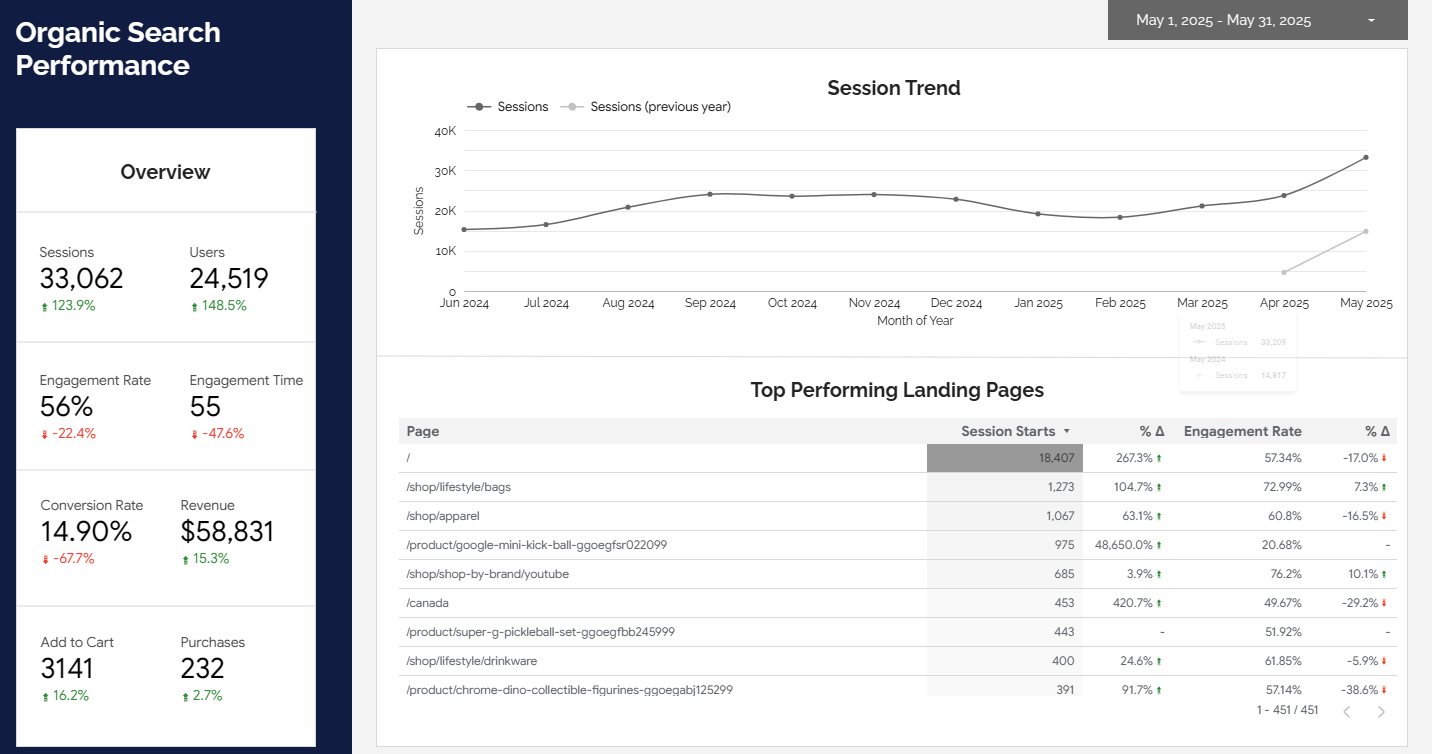
“Organic search led to 33,062 sessions. This represents an 123.9% increase compared to last year. We’re pleased to see the category page about Lifestyle Bags as a top-performing landing page. We revised and expanded this content two months ago. This signals that our content strategy around content revisions is impactful.”
Keyword Performance
The final section of the report to analyze is Keyword Performance. This is rank tracking data, which can be a leading indicator of upcoming success. For example, if you have a client who has only engaged in SEO for a few months, they may not yet see significant increases in sessions. Instead, they may see steady improvements in their keyword rankings, helping them move to a place of increases in traffic and sales.
Again, look for any keywords that map to work you’ve done for your client so you can tie actions to results.
Here’s an example:
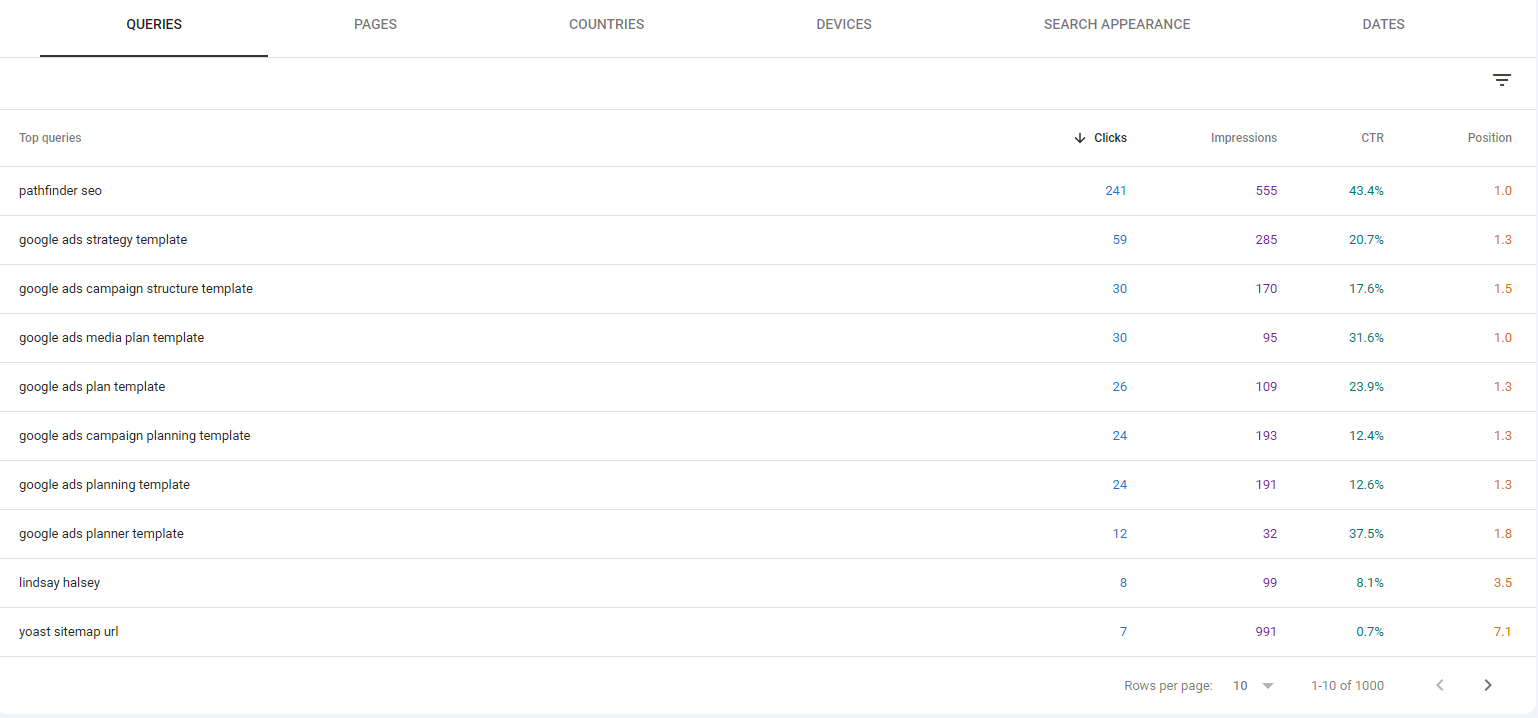
“Also noteworthy is the improvement in keyword rankings for phrases related to Google Ads. This content was also recently updated and is a significant contributor to your website's lead generation.”
Additional Tips on Analyzing the Report
Our Google Looker Studio SEO reports contain high-level data that is meaningful for your client without being overwhelming. We don’t want to send 10+ page reports that pull every statistic imaginable from Google Analytics. When you analyze the report, you may need to dive deeper into Google Analytics or the Google Search Console to provide context around the metrics.
The catch is that you want to avoid going down every rabbit hole so that your monthly reporting efforts stay within the project scope. Many agencies allocate 30 - 60 minutes for reporting. You may spend 30 minutes analyzing the report and then 15 minutes finalizing the email summary. Timeboxing can be critical, so you don’t get lost in data for hours.
How to Send a Monthly Report
With your analysis complete, you can email the report to your client. Export the Google Looker Studio report to PDF and attach it to an email. Then, complete your written report summary for the body of the email. Here’s an example:
Hi [Client Name],
I hope this email finds you well. I’ve attached the May SEO report.
Last month, the website recorded X sessions, a Y% increase from the previous month and a Z% increase from the prior year. Engagement remains strong, with the average visitor spending 3 minutes and 7 seconds on the website. All traffic channels contributed to the growth in sessions.
Organic search led to X sessions. This represents an Y% increase compared to last month and a Z% increase compared to last year. We’re pleased to see the blog post about (recent topic you've made a post about) as a top-performing landing page. We revised and expanded this content two months ago. This signals that our content strategy around content revisions is impactful.
Also noteworthy is the improvement in keyword rankings for phrases related to (some content you've created and optimized for a keyword). This recently updated content significantly contributes to your website's lead generation.
Tasks Completed Last Month:
- Google Maps — Listing updates.
- Blog Post — Revision of “Blog Post Topic”.
Tasks for this Month:
- Category Page — Optimization for blog post categories, including custom page titles and meta descriptions.
- Blog Post — New post on “Blog Post Your Created”.
I’m looking forward to our monthly call on June 1 at 2 pm. In the meantime, please don’t hesitate to reach out with questions.
Best,
[Your Name]
You probably noticed a list of tasks completed the previous month and tasks for this month in the email. This is your miniature scope of work so that you highlight the work you are doing on their behalf. This comes from your project management.
When sending monthly reports, the recommended flow for the email stays consistent each month:
- Overview of last month’s performance
- Tasks completed last month
- Tasks for this month
- Anything you need from the client, like a meeting or approval on pending content
This consistency makes it easy for your clients to digest the monthly emails and for your agency to deliver.
Monthly Reporting & Project Management
Project management is part and parcel of monthly reporting. Without it, you don’t have a task list for the upcoming month.
Here are a few tips:
- Assign all tasks for the upcoming month, including who will complete them and when they are due. This way, nothing will get lost.
- If you brainstormed new task ideas, add them to a future list for the client. Sometimes, we get good ideas for impactful future SEO tasks that we can weave into their plan in the coming months. If you don’t write these down, they, too, will get lost.
How to Handle Traffic Declines and Down Data
The most challenging part of monthly SEO reporting is handling decreased sessions or conversions. That said, it’s part of offering SEO services. Your services aren’t being delivered in a vacuum. There are external factors that can lead to shifts in traffic that are outside of your control. Here are examples:
- Decreased Demand: If your client has less demand for their product or services, they may see traffic decrease even with more visibility on Google. The Google Search Console can often validate this when looking at keyword performance data and checking how impressions are trending for core keywords. You may also learn more about demand by talking to the client so you know their industry well.
- Algorithm Changes & Search Engine Layout Updates: Sometimes, Google’s algorithm evolves with a Core Update that may impact your client’s rankings. Other times, Google rolls out a new feature like AI Overviews, which decreases click-through rates. You can follow along with our SEO News recaps to learn how search engine algorithms are evolving, which will help you spot any impact this may have on your client’s performance.
When you have a decrease in performance, the best thing you can do for your client is to help them understand the why (it may be multiple factors) and how you are adjusting their SEO strategy to help combat it. This is actually where trust is built in delivering SEO services. It’s not just in the good times that clients are happy. It’s when you show that you are transparent about the data and have a strategic plan because you understand their business and SEO.
Frequently Asked Questions
How much time should I spend on monthly SEO reporting?
Creating the physical report each month should only take a matter of seconds via an automated approach. The time investment comes in analyzing the data and email summary for the client. This process takes 30 minutes to 1 hour for small to medium-sized businesses and 1 to 2 hours for large to enterprise clients.
Do clients even open their monthly reports?
Some SEOs question the value of monthly reporting because they doubt their clients open the reports. That may be true sometimes, but the value is still there. The client will have your monthly reports as a reference if they ever call into question your monthly action items and the results. They are also likely to read the report summary in the body of the email, even if they don’t download the PDF. And finally, you, as an SEO account manager, need to be on top of the data so you can proactively and strategically manage the account.
Managing Monthly SEO
SEO reports are part and parcel of the larger skill of managing monthly SEO for your clients. This is part art and part science.
At Pathfinder SEO, we provide our agency customers with a business system to master managing monthly SEO. This starts with creating monthly packages and getting the pricing right. Then, we help you market and sell the service. And most importantly, we streamline the delivery of SEO services.
Our SEO services system includes these resources to make managing monthly SEO easier and more profitable for agencies:
- Monthly SEO task roadmaps. This project management resource outlines tasks for months 1 - 12 of an SEO services offering.
- Email templates for delivering monthly SEO reports. Leverage these templates to standardize your monthly SEO reporting process.
- Process documentation for monthly SEO tasks. Enable junior team members to provide tactical support to complete monthly action items.
- Skills training to master the skills of monthly SEO reporting, monthly SEO project management, and more.
- Group coaching to get your questions answered. We go further, faster together.
Google Looker Studio for Custom Reporting
Automate your marketing reports and focus on the data that matters.
Learn how to build custom reports that integrate with Google Analytics, Google Ads, and more in this 1-hour course.
Bonus: Google Looker Studio Monthly SEO Template