
Are you wondering why your product pages aren’t showing up in search results? Small mistakes like copying manufacturer text or having messy URLs can make your pages invisible to search engines. The good news? Each problem has a clear fix. This guide explains common issues and shows you how to resolve them, one by one.
Duplicate or Thin Descriptions
Problem: If you copy the manufacturer’s description or use very short text, your product pages might be seen as duplicates or “thin” content. Pages with little or no description rarely rank well..
Fix: Write your own product descriptions with 300 to 500 words. Focus on benefits and features, and break them into short paragraphs or bullet points. Use a friendly tone and answer common questions. Unique content tells search engines and shoppers why your product is special.
Weak Titles and Meta Descriptions
Problem: Titles that lack key details or are too long make it hard for search engines to understand your page. Generic or missing meta descriptions reduce click‑through rate. Below is an example of a poor page title & meta description (it’s missing in this one!).
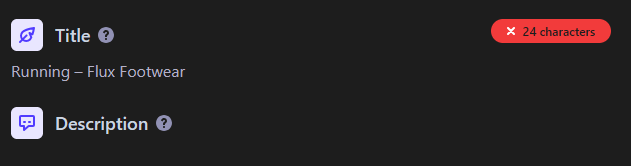
Fix: Keep titles under 60 characters and include the brand, product name, and important attributes of the product. Meta descriptions should be under 160 characters and include a CTA, like “Shop now” or “Order today”. These short snippets help search engines display your page correctly.
Free Download: Shopify SEO Starter Kit
Make your Shopify store easier to find on Google with our free SEO Starter Kit. Inside, you’ll get step-by-step checklists, templates, and quick wins to boost visibility and sales.
Missing or Misused Headings
Problem: If your page doesn’t have clear headings, search engines and shoppers can’t easily scan it. Using generic H1s or skipping H2s makes the page feel lacking. Below is another example of a rather lacking heading structure on a product page.

Fix: Use the H1 tag for your product name and H2 tags for sections like features, specs, reviews, and FAQs. Headings help search engines and AI crawlers understand the structure of your page and let readers navigate the product page quickly.
Messy URLs and Duplicate Pages
Problem: Long URLs with random numbers or symbols confuse users and search engines. Having multiple pages for one product without proper tags can cause duplicate content deindexing by Google.
Fix: Create clean, descriptive URLs like yourstore.com/shoes/running-model-x. If your product has many variations (color or size), choose one main page and add a canonical tag to point to it.
Missing Structured Data (Schema)
Problem: Without structured data, Google may not display your product details like price, rating, or availability in search results. You miss out on rich snippets that can increase clicks on your web pages in the search results.
Fix: Add product schema to include details like name, description, price, brand, SKU, availability, and reviews. Also, use FAQ or Q&A schema if you have a question section. This code tells search engines what your page is about, which can lead to more robust search listings.
Slow Pages and Heavy Images
Problem: Large images and uncompressed scripts from apps or design choices make pages slow. Slow pages equal lower conversions. Google is also using page speed as a ranking factor so it can directly affect how your pages rank.
Fix: Compress your images and use efficient formats like JPEG or WebP. Lazy‑load images below the fold and remove unnecessary scripts to speed up your pages. Speaking of images, you should also name each image file clearly (e.g., “blue-running-shoe.jpg”) and add alt text that describes the image.
No Reviews or FAQs
Problem: If you have no customer reviews or answers to common questions, your pages look empty and may not rank as well.
Fix: Encourage customers to leave reviews on your product pages. Reviews add fresh content and build trust. Also, add a short FAQ section to answer common questions and apply FAQ schema so search engines and AI systems know it’s there.
Weak Internal Links and Navigation
Problem: Orphaned product pages (pages with no links pointing to them) can be invisible to search engines or AI and hard for customers to find.
Fix: Link from high‑performing pages (like your best blog posts or categories) to related products. Use descriptive anchor text like “running shoes for flat feet,” not “click here”. Add breadcrumb navigation so shoppers and search engines know where they are.
Poor Mobile Experience and Lack of Trust
Problem: Small buttons, hard‑to‑read fonts, and missing security badges chase away mobile users and can hurt your rankings.
Fix: Use a responsive design or theme with large buttons and clear text. Display trust badges, an SSL security certificate, and clear return policies.
Mismanaged Out‑of‑Stock Items
Problem: When a product is out of stock, some store owners delete the page or let it show a “404 Not Found,” which tells search engines the page is a dead end.
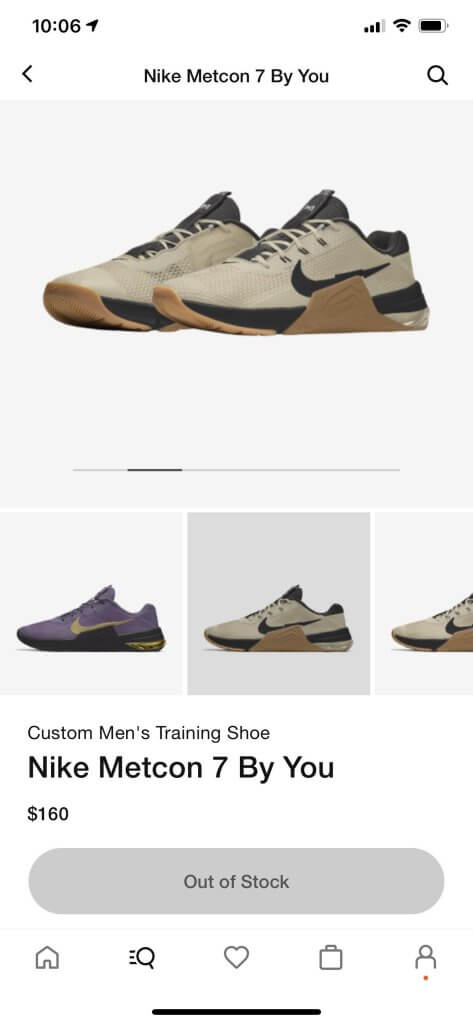
Fix: Keep out‑of‑stock pages live. Explain that the item is out of stock, let visitors sign up for restock alerts, and suggest similar products. Mark the product’s availability in the schema as “OutOfStock”. Below you can see an example of some out-of-stock shoes Nike has listed.
No Blog or Content Marketing
Problem: Without a blog or helpful articles, your website lacks authority. Search engines like sites that answer related questions to products they offer and have content to reinforce your knowledge of the industry.
Fix: Write blog posts about topics that connect to your products. For example, “How to Choose the Perfect Running Shoes.” Link those articles back to your product pages. This not only helps SEO but also builds trust with potential customers.
Conclusion
Your product pages can rank higher with a few simple improvements: clear titles and headings, unique descriptions, friendly URLs, structured data, fast pages, customer reviews, strong internal links, mobile‑friendly design, and thoughtful management of out‑of‑stock items. Pairing each problem with its fix makes it easier to see where to start. Take one step at a time, and you’ll soon see more visitors and more sales.
If you’re looking to learn more about how SEO can help you sell more products check out our full Beginner’s Guide to Shopify SEO.
Free Download: Shopify SEO Starter Kit
Make your Shopify store easier to find on Google with our free SEO Starter Kit. Inside, you’ll get step-by-step checklists, templates, and quick wins to boost visibility and sales.