
If your client offers products or services in a single geographic location, it’s relatively easy to capitalize on local search for their core keywords. Their keyword strategy includes the service or product and the location—think “interior designer in Denver.” These pages map to the homepage or a services page.
What if your client offers multiple products or services in multiple target locations? What if they don’t have a physical location but a service area? What if they want visibility on Google in a geographic area other than their physical address? It quickly gets more complicated.
Your digital agency is likely a great example of this. You may have multiple services (web design, web development, SEO, and social media management) in multiple target locations (Denver, Salt Lake City, and Phoenix, for example). How do you capitalize on keywords with local intent in this scenario?
Often, the answer is to create location-specific pages. The number of location pages can quickly balloon, and the strategy is nuanced, in part to avoid duplicate content. To master the skill of gaining visibility on Google for local intent keywords, there are two concepts:
- How to create a great location page (think user experience)
- How to determine how many and which pages to create (think overarching strategy)
Let’s explore each in more detail.
Creating User-Friendly & High-Quality Location Pages
What are Location Pages?
A location page is any website page that targets a service or product and a geographic area. For example, the homepage of a roofing contractor's website would be considered a location page, which in this example is targeted around “San Diego roofing contractor.”
Alternatively, a location page may be an office page like this example of a doctor's practice with multiple locations. In other examples, a location page may not feature an address. Consider Airbnb, which has location landing pages for each city and town, as in this example.
What Makes a Location Page Useful?
A location page is helpful when built for the intended audience, not just to get traffic from search engines. This is known as audience-first SEO, which is all about the user.
In the case of a location page for a business with an office or physical presence, these locations would readily share accurate information about the address, hours of operation, phone number, etc. This is useful.
The location page should again focus on the user for a business without a physical presence. For example, the web designer may create location pages to showcase a portfolio of web projects targeted to that geographic region to show the type of work the agency does in that city. This, too, is useful.
What Should be Included on a Location Page for SEO?
It depends on the audience. Here are common elements that may be included in a location page:
- Address
- Phone Number
- Email Address
- Hours of Operation
- Contact Form
- Location Specific Images
- Introductory Copy
- List of Services
- Portfolio
- Testimonials
- Frequently Asked Questions
- Blog Posts
Ultimately, the goal is to differentiate content if your client has multiple target locations. This lawn care website is a good example of how to do this: It shows how the company has created a page template that can be applied to many locations.
What are the Downsides of Location Pages?
The biggest downside of location pages is that they lend themselves to duplicate or thin content. A site can create dozens or more such pages at scales that are merely copies of one another with the location keyword swapped out.
This is overwhelming for search engines and wastes crawler resources. Yet, we still see examples of how this type of strategy works when the audience is prioritized over SEO.
Join our Monthly Newsletter
Stay ahead in SEO. Get once-a-month updates with SEO tips and news.

Crafting the Location Page SEO Strategy
Now that you can create a great location page, let’s dive into the overall strategy.
Our goal is to find a balance between needing more location-oriented content on a website and having too many thin and duplicate pages.
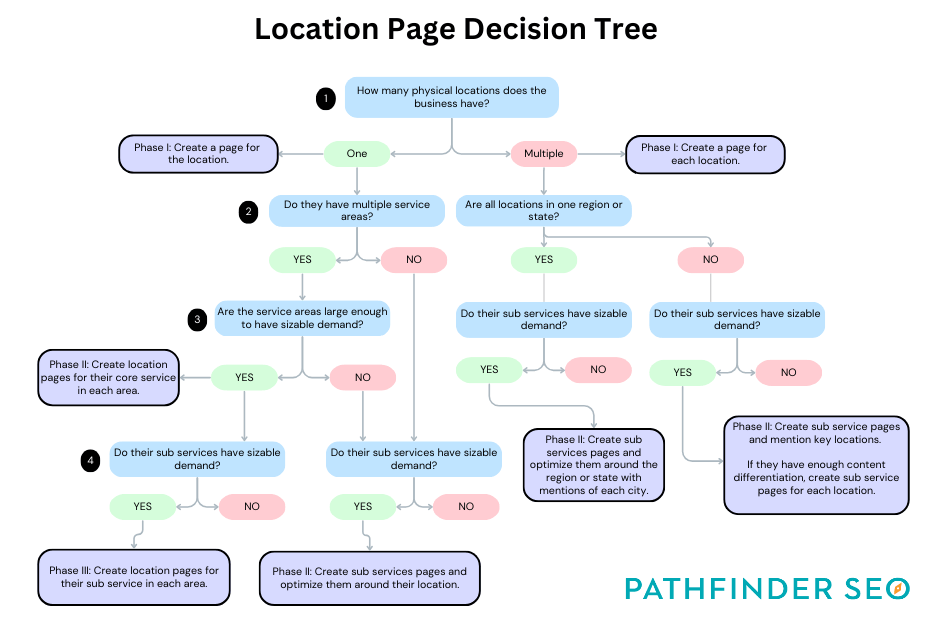
We also want to phase the effort by capitalizing on the pages that are already on a website in phase I and then creating additional pages as part of our monthly SEO efforts for clients.
The exact playbook here depends on the client’s business, including their:
- Demand for their core keywords
- Size of geographic market
- Budget for SEO
We’ve created a decision tree that you can download to help walk you through crafting the strategy.
Location Page Examples
Let’s look at a few examples of location pages and the strategy behind them.
Location Page Strategy for a Single Location Business
Consider a San Diego-based roofing contractor with one location. We can start our efforts by optimizing the homepage around keywords such as “San Diego roofing contractor.” There is also demand for sub-services like residential, commercial, roof repairs, and roof replacements. We can optimize each sub-service page around applicable phrases like “San Diego commercial roofing contractor.” We may also touch up the contact page to hit on the location more.
Then, we want to evaluate the opportunity to expand into neighborhood-specific pages. Is there a demand for “La Jolla roofing contractor” or “Coranado roofing contractor”? You can look on Google to see if the search kicks in. You can also explore data in the Google Search Console and Pathfinder’s keyword research tool.
Along the way, also consider the neighborhoods + sub-services. This is likely getting too granular for demand; creating such pages would create thin content. It is also likely outside of your client’s budget for SEO services.
You’ll likely create 5-10 neighborhood pages in phase II of your effort. You can talk to the client to help guide them in their favorite neighborhoods to work in and cross-reference that with the demand that’s out there.
Location Page Strategy for a Location Independent Business
Your digital agency is likely a great example here. Although you may share a physical location on your contact page and Google Maps listing, your clients may not be limited to your local area.
At our agency, we serve clients all over the US and beyond. We have a few geographic markets where we have more clients than others. Seattle is a good example. We don’t have an office there, but we could create a page targeting “Seattle SEO agency.” The key content components would be case studies, project portfolios, and testimonials oriented around our Seattle-based clients.
The key is to identify the opportunity from a business perspective. Do we want more clients in specific geographic markets? If so, the next step is to build pages for each market.
Location Pages for SEO: To Build or Not To Build
Targeting multiple locations in SEO requires a strategic approach to ensure that location pages are valuable to users first and search engines second.
While creating duplicate pages with location keywords swapped out may be tempting, this strategy is unlikely to provide long-term SEO success. By prioritizing the audience's needs and ensuring that each location page provides value, businesses can effectively target multiple locations and improve their SEO performance.
This is the type of topic we cover often during Office Hours for Pathfinder subscribers. You can bring your questions and we can review your overall location page strategy together. Sign up for Pathfinder and join a community of like-minded agency owners who are starting and growing their SEO services offering.

Pathfinder makes SEO approachable, impactful and fun!
This course is part of the Pathfinder approach to SEO, a guided system. Membership includes:
Courses — Distilling decades of experience into actionable SEO courses and training. Take a step-by-step approach.
Coaching — You don’t have to go it alone. We’ll be here with group and 1:1 coaching.
Community — Stay updated on all things SEO with our engaged community.
All for $99/month. Cancel anytime.